MEXC Futures Trailing Stop Order FAQsMEXC Futures Trailing Stop Order FAQs
Category List
Cancel

MEXC Futures Trailing Stop Order FAQs

1. What is a trailing stop order?


A trailing stop order is a strategic order that tracks the market price, allowing users to preset an order within a specific price range defined by a percentage or a fixed value relative to the market price during volatility. When the market trend reverses and pulls back, the trailing stop order submits the trader's configured order to the market.

As the price moves in a favorable direction, the trailing stop order adjusts accordingly. As long as the price continues to move favorably, the trigger price will follow, helping users lock in profits while riding the trend. If the price moves in the opposite direction by a specified percentage, the system automatically submits a market order to reduce or close the position. This helps limit losses and protect gains during unfavorable market movements.

A key feature that distinguishes a trailing stop order from a standard limit order is that the trigger price never moves in the opposite direction. Once it moves up for a sell order or down for a buy order with the market, it stays at that level even if the market retraces.


2. How is the trigger price for a trailing stop order calculated?


The calculation of the trigger price depends on the trading direction:

For sell orders (long position): The actual trigger price equals the all-time high price minus the trail variance (price distance), or the highest historical price multiplied by (1 - trail variance percentage).
Example: If the highest historical price is 50,000 USDT and the trail variance is set to 5%, the trigger price is calculated as 50,000 × (1 − 5%) = 47,500 USDT

For buy orders (short position): The actual trigger price equals the lowest historical market price plus the trail variance, or the lowest historical price multiplied by (1 + trail variance percentage).
Example: If the lowest historical price is 20,000 USDT and the trail variance is 5%, the trigger price is calculated as 20,000 × (1 + 5%) = 21,000 USDT

3. What is the trail variance?


The trail variance is the primary condition used to calculate the actual trigger price. Users can set this using two methods: Percentage or price distance.

Percentage: Assuming the highest historical price is 50,000 USDT and the trail variance is set to 5%, Trigger Price = 50,000 × (1 − 5%) = 47,500 USDT

Price Distance: Assuming the highest historical price is 50,000 USDT and the trail variance is set to 5,000 USDT, Trigger Price = 50,000 − 5,000 = 47,500 USDT

4. What is the activation price for a trailing stop order?


The activation price is the condition required to activate a trailing stop order. The order becomes active only when the specified price type (last price, fair price, or index price) reaches or exceeds the activation price. The system begins calculating the actual trigger price only after the order has been activated.

If no activation price is set, the order will be activated immediately upon placement. Setting an activation price helps users precisely control when the order becomes effective, preventing the order from triggering at unfavorable price levels.

5. In which trading scenarios are trailing stop orders applicable?


Trailing stop orders are primarily suitable for the following trading scenarios:

1) Buying on a Rebound: When a user anticipates that the market will continue to fall but expects a rebound at a certain level, they can set a trailing stop order to automatically buy once the rebound reaches a specific magnitude. Example: Current BTC price is 39,000 USDT. The user predicts the price may drop to 37,000 USDT before rebounding and wishes to buy when the rebound reaches 1%. They can set a buy trailing stop order with an Activation Price of 37,000 USDT and a trail variance of 1%.

2) Selling on a Pullback: When a user anticipates that the market will continue to rise but expects a pullback after reaching a certain peak, they can set a trailing stop order to automatically sell once the pullback reaches a specific magnitude. Example: Current BTC price is 40,000 USDT. The user predicts the price may rise to 42,000 USDT before falling and wishes to sell when the drop reaches 1%. They can set a sell trailing stop order with an activation price of 42,000 USDT and a trailing stop distance of 1%.

3) Locking in Profits: When the price of a held position continues to rise, a trailing stop order helps users automatically lock in profits, ensuring they do not miss the optimal exit opportunity if the price reverses.

4) Limiting Losses: During a market decline, trailing stop orders can be used to protect capital and prevent losses from expanding due to sharp price corrections.

6. What are the pros and cons of trailing stop orders?


The primary advantages of trailing stop orders lie in the controllability of the profit model and the replicability of the trading strategy. They enable traders to dynamically adjust the trigger price during volatile market conditions, allowing them to maximize profits in favorable trends while effectively controlling losses in unfavorable ones.

The main disadvantage is that due to the high volatility of the cryptocurrency market, setting the appropriate trail variance can be challenging. If set too tight, normal market fluctuations may trigger the order prematurely, causing you to exit the position too early and miss out on further potential profits. If set too wide, the order may fail to trigger in time during a reversal, resulting in missed opportunities to lock in profits or limit losses.

7. How to set up a trailing stop order on MEXC?


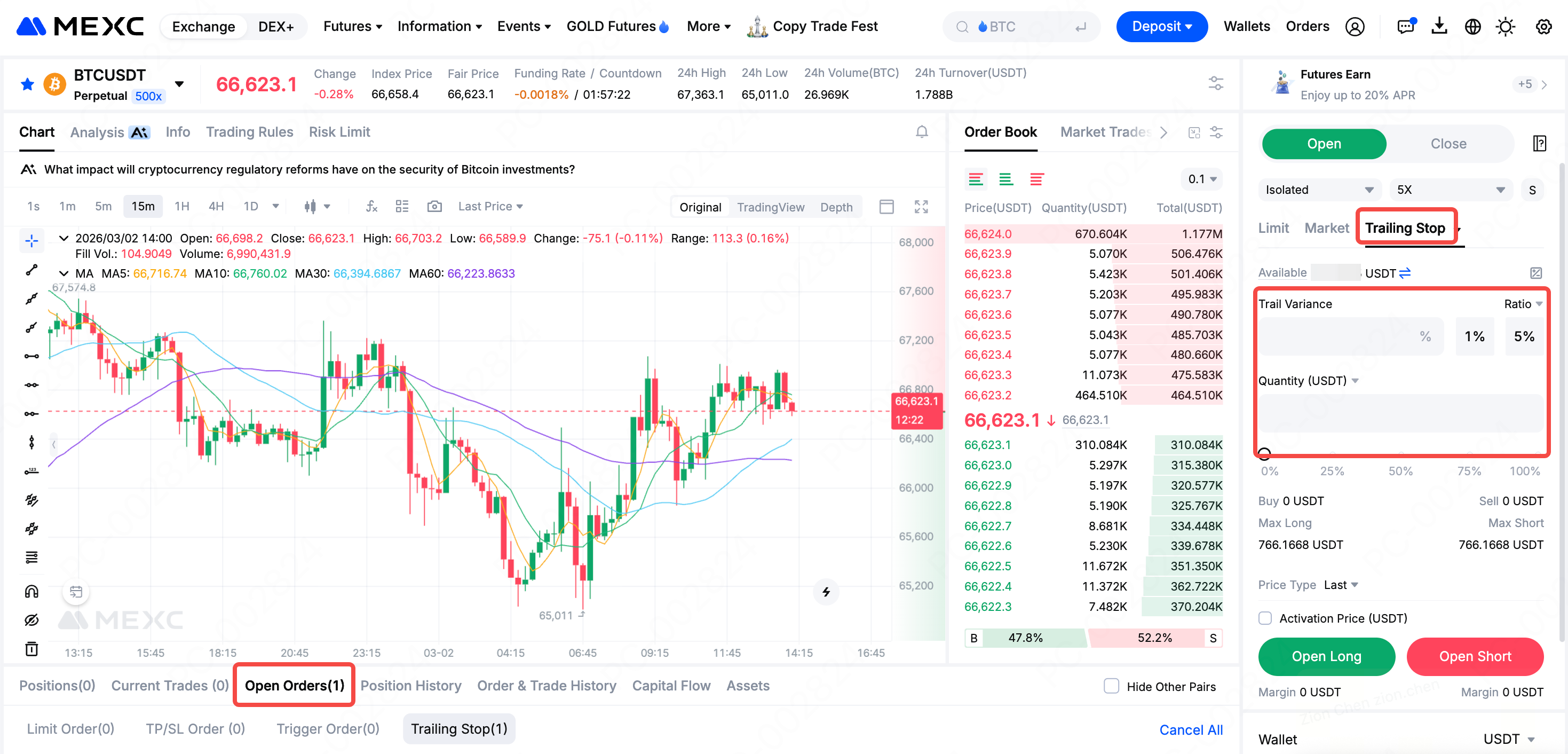
Web: Navigate to the Futures trading page, select Trailing Stop, enter the Trail Variance and Quantity, set the Activation Price, and then click Open Long or Open Short.

Once set, you can view the configured orders in the Open OrdersTrailing Stop list, and modify or Cancel them at any time.

App: Navigate to the Futures trading page, select Trailing Stop, enter the Ratio and Quantity, set the Activation Price, and then click Open Long or Open Short.

Once set, you can view the configured orders in the Open OrdersTrailing Stop list, and modify or Cancel them at any time.


8. How to view and edit existing trailing stop orders?


On the MEXC official website and app, you can view all currently submitted trailing stop orders in the Open Orders list by switching the order type filter to Trailing Stop.

For trailing stop orders with the status Pending Trigger, you can click the edit icon to modify them. Please note that orders with the status Active (currently tracking market movements) cannot be edited temporarily.

To cancel a trailing stop order, click the delete icon on the Trailing Stop page to cancel a single order, or click the Cancel All button to revoke all trailing stop orders at once.


MEXC Futures Trailing Stop Order FAQs

1. What is a trailing stop order?


A trailing stop order is a strategic order that tracks the market price, allowing users to preset an order within a specific price range defined by a percentage or a fixed value relative to the market price during volatility. When the market trend reverses and pulls back, the trailing stop order submits the trader's configured order to the market.

As the price moves in a favorable direction, the trailing stop order adjusts accordingly. As long as the price continues to move favorably, the trigger price will follow, helping users lock in profits while riding the trend. If the price moves in the opposite direction by a specified percentage, the system automatically submits a market order to reduce or close the position. This helps limit losses and protect gains during unfavorable market movements.

A key feature that distinguishes a trailing stop order from a standard limit order is that the trigger price never moves in the opposite direction. Once it moves up for a sell order or down for a buy order with the market, it stays at that level even if the market retraces.


2. How is the trigger price for a trailing stop order calculated?


The calculation of the trigger price depends on the trading direction:

For sell orders (long position): The actual trigger price equals the all-time high price minus the trail variance (price distance), or the highest historical price multiplied by (1 - trail variance percentage).
Example: If the highest historical price is 50,000 USDT and the trail variance is set to 5%, the trigger price is calculated as 50,000 × (1 − 5%) = 47,500 USDT

For buy orders (short position): The actual trigger price equals the lowest historical market price plus the trail variance, or the lowest historical price multiplied by (1 + trail variance percentage).
Example: If the lowest historical price is 20,000 USDT and the trail variance is 5%, the trigger price is calculated as 20,000 × (1 + 5%) = 21,000 USDT

3. What is the trail variance?


The trail variance is the primary condition used to calculate the actual trigger price. Users can set this using two methods: Percentage or price distance.

Percentage: Assuming the highest historical price is 50,000 USDT and the trail variance is set to 5%, Trigger Price = 50,000 × (1 − 5%) = 47,500 USDT

Price Distance: Assuming the highest historical price is 50,000 USDT and the trail variance is set to 5,000 USDT, Trigger Price = 50,000 − 5,000 = 47,500 USDT

4. What is the activation price for a trailing stop order?


The activation price is the condition required to activate a trailing stop order. The order becomes active only when the specified price type (last price, fair price, or index price) reaches or exceeds the activation price. The system begins calculating the actual trigger price only after the order has been activated.

If no activation price is set, the order will be activated immediately upon placement. Setting an activation price helps users precisely control when the order becomes effective, preventing the order from triggering at unfavorable price levels.

5. In which trading scenarios are trailing stop orders applicable?


Trailing stop orders are primarily suitable for the following trading scenarios:

1) Buying on a Rebound: When a user anticipates that the market will continue to fall but expects a rebound at a certain level, they can set a trailing stop order to automatically buy once the rebound reaches a specific magnitude. Example: Current BTC price is 39,000 USDT. The user predicts the price may drop to 37,000 USDT before rebounding and wishes to buy when the rebound reaches 1%. They can set a buy trailing stop order with an Activation Price of 37,000 USDT and a trail variance of 1%.

2) Selling on a Pullback: When a user anticipates that the market will continue to rise but expects a pullback after reaching a certain peak, they can set a trailing stop order to automatically sell once the pullback reaches a specific magnitude. Example: Current BTC price is 40,000 USDT. The user predicts the price may rise to 42,000 USDT before falling and wishes to sell when the drop reaches 1%. They can set a sell trailing stop order with an activation price of 42,000 USDT and a trailing stop distance of 1%.

3) Locking in Profits: When the price of a held position continues to rise, a trailing stop order helps users automatically lock in profits, ensuring they do not miss the optimal exit opportunity if the price reverses.

4) Limiting Losses: During a market decline, trailing stop orders can be used to protect capital and prevent losses from expanding due to sharp price corrections.

6. What are the pros and cons of trailing stop orders?


The primary advantages of trailing stop orders lie in the controllability of the profit model and the replicability of the trading strategy. They enable traders to dynamically adjust the trigger price during volatile market conditions, allowing them to maximize profits in favorable trends while effectively controlling losses in unfavorable ones.

The main disadvantage is that due to the high volatility of the cryptocurrency market, setting the appropriate trail variance can be challenging. If set too tight, normal market fluctuations may trigger the order prematurely, causing you to exit the position too early and miss out on further potential profits. If set too wide, the order may fail to trigger in time during a reversal, resulting in missed opportunities to lock in profits or limit losses.

7. How to set up a trailing stop order on MEXC?


Web: Navigate to the Futures trading page, select Trailing Stop, enter the Trail Variance and Quantity, set the Activation Price, and then click Open Long or Open Short.

Once set, you can view the configured orders in the Open OrdersTrailing Stop list, and modify or Cancel them at any time.


App: Navigate to the Futures trading page, select Trailing Stop, enter the Ratio and Quantity, set the Activation Price, and then click Open Long or Open Short.

Once set, you can view the configured orders in the Open OrdersTrailing Stop list, and modify or Cancel them at any time.


8. How to view and edit existing trailing stop orders?


On the MEXC official website and app, you can view all currently submitted trailing stop orders in the Open Orders list by switching the order type filter to Trailing Stop.

For trailing stop orders with the status Pending Trigger, you can click the edit icon to modify them. Please note that orders with the status Active (currently tracking market movements) cannot be edited temporarily.

To cancel a trailing stop order, click the delete icon on the Trailing Stop page to cancel a single order, or click the Cancel All button to revoke all trailing stop orders at once.